didder

Host program

Host handbook

Everything a Didder host needs to know: the room rules, how your month is counted, step-by-step guides and how your points work. Your agency should brief you on these rules too.

Room rules

  1. 1. 18 or over, always

    Only people aged 18 or over may use Didder, host a room or take a seat. A minor in a room ends the room and the account.

  2. 2. Be yourself

    Hosting requires face verification. Do not impersonate another person, brand or agency, and do not use another person's account.

  3. 3. No sexual content

    Sexual, pornographic or obscene content is forbidden, in voice, in the chat, in photos and in covers.

  4. 4. Respect everyone

    No harassment, threats, hate speech or discrimination, in the room or in messages.

  5. 5. Nothing dangerous

    No glorifying violence or illegal substances, no hosting while drunk, nothing that encourages a crime.

  6. 6. One app at a time

    Do not promote other live apps or stream the same room on another app at the same time.

  7. 7. No scams or private data

    No scams, fake receipts, spam or selling outside the app, and never share anyone's personal data.

  8. 8. Moderation decides

    The Didder team may remove content, close a room, suspend or ban an account that breaks these rules or the Terms of Service.

Community guidelines

How your month is counted

  • The month follows Brasília time and closes on the last day at 23:59. Gifts received after that count toward the next month.
  • A valid day is a day with the minimum live time asked by the program. Both the number of days and the total hours count.
  • Live time counts by your presence in the room, even with your microphone off.
  • When you meet the days and hours of your level, the held part of the month's points is released automatically.
  • Your progress in the month is always in Profile → Host center.

Step by step

How to open your room

  1. 1Tap the live button in the middle of the bottom bar.
  2. 2Choose an audio live, add a title and a cover, and pick your tags.
  3. 3Choose public, or private with a password.
  4. 4Tap Start. To finish, open the options and tap Leave and close room.

Some room types ask for face verification first. Do it in your profile when the app asks.

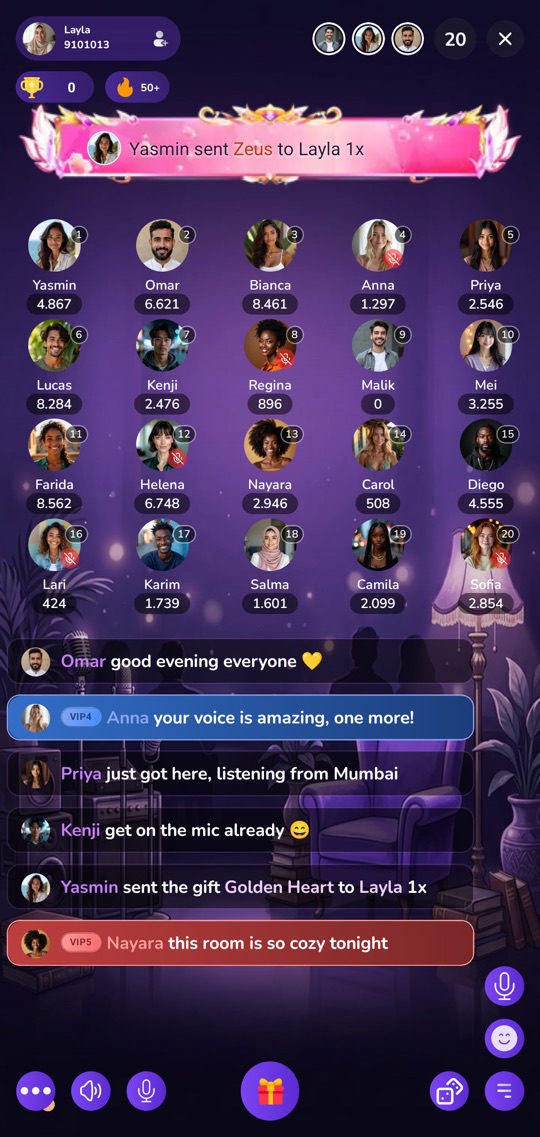
How to run the seats

  1. 1Tap an empty seat to invite someone, or accept requests from the waiting list.
  2. 2Tap a person on a seat to close their mic or move them back to the audience.
  3. 3Lock or reserve seats from the room options.
The seat grid of a voice room

How to withdraw

  1. 1Go to Profile → Wallet → Points.
  2. 2Register your payout method the first time.
  3. 3Request the withdrawal and follow it in the withdrawal history.

Withdrawals go through identity and security checks, and follow the minimum amounts, fees and times shown in the app.

How points work

  • Gifts you receive in rooms become points in your host wallet.
  • Points can be withdrawn, converted into coins or transferred, as shown in the app.
  • Bonus points from daily tasks and agency tasks are added to your balance when you redeem them.
  • Your agency's commission is paid by Didder and does not come out of your points.

Questions? Talk to your agent or write to [email protected].